By
ByThe traditional 9-to-5 grind is no longer the only way to earn a living. In 2025, the “Gig Economy” has exploded, offering unprecedented freedom to students, stay-at-home parents, and professionals looking to escape the cubicle.
Whether you want to earn a side income of ₹20,000 ($250) or build a full-time career earning ₹1 Lakh+ ($1,200+) per month, freelancing is the gateway. However, for a beginner, the sheer number of platforms can be overwhelming. Which ones are safe? Which ones pay well? Which ones are scams?
This guide analyzes the top freelance platforms, breaks down their fee structures, and provides a roadmap for landing your first client.
What is Freelancing?
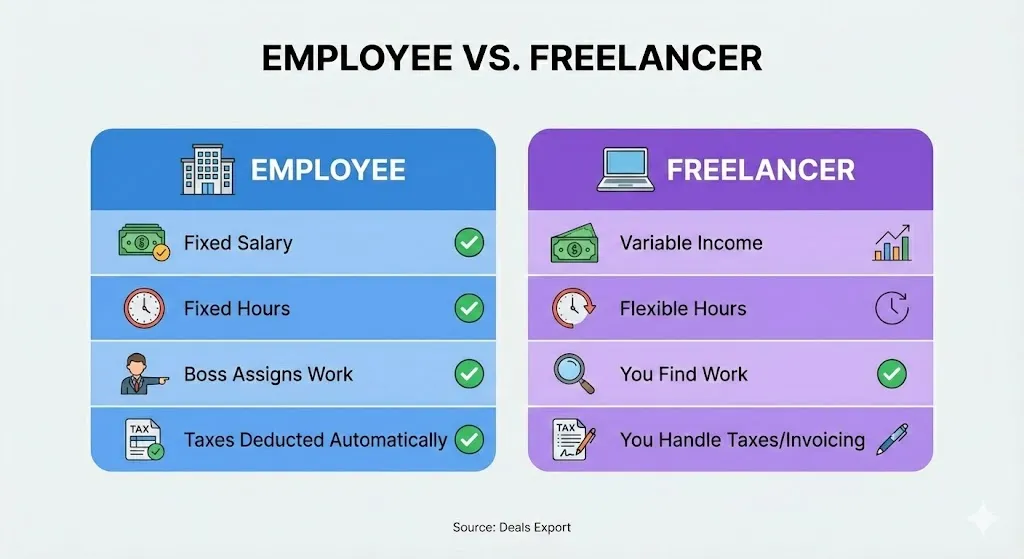
Before diving into the websites, it is crucial to understand the model. A freelancer is a self-employed individual who offers services to clients on a project basis. You are not an employee; you are a business owner.
The Freedom Factor
The primary allure of freelancing is control. You decide when you work, where you work, and who you work with. There is no boss hovering over your shoulder, and no commute in traffic.
The Reality Check
However, with freedom comes responsibility. In a traditional job, you get paid even if you have a slow day. In freelancing, no work equals no pay. You are responsible for finding clients, managing your taxes, and ensuring you get paid on time.
Essential Prerequisites (Before You Sign Up)
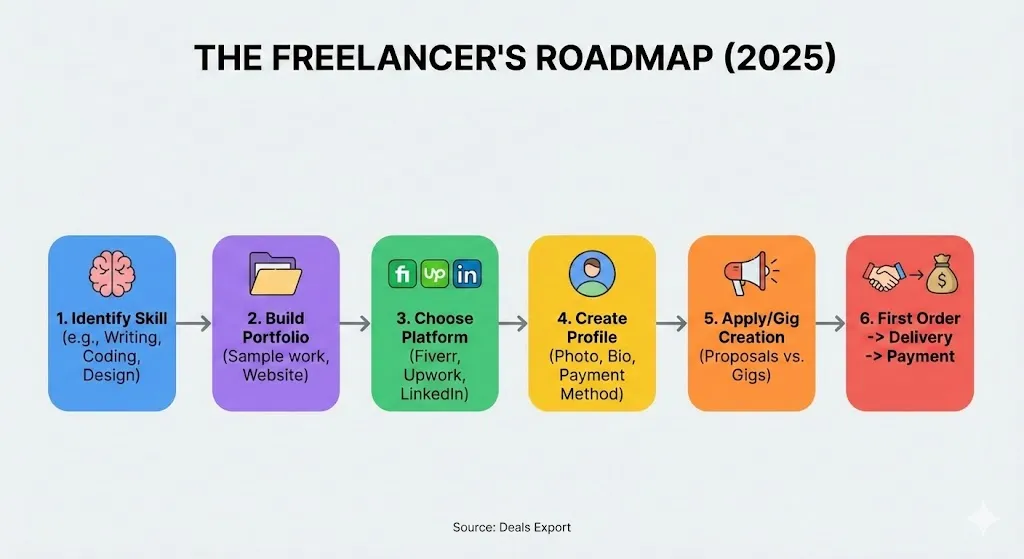
Many beginners fail because they sign up for websites without preparation. To succeed in 2025, you need three things in place before you create an account.
1. A Defineable Skill
“I can do anything” is a red flag for clients. You must pick a niche.
- Low Barrier (Easier to start): Data Entry, Transcription, Virtual Assistant, Basic Content Writing.
- High Barrier (Higher pay): Web Development, UX/UI Design, Video Editing, SEO Specialist.
2. A Digital Portfolio
Clients do not care about your university degree; they care about what you can do.
If you are a writer, have 3 sample articles ready in a Google Doc. If you are a designer, have a Behance link ready. If you have no experience, create “mock” projects to show your skills.
3. Payment Gateways
Most international clients cannot transfer money directly to your local bank account easily. You need a global payment processor.
- PayPal: The industry standard. Widely accepted but has higher transaction fees.
- Payoneer: Very popular for freelancers in India and Asia. Lower fees and better exchange rates than PayPal.
- Wise (formerly TransferWise): Excellent for direct bank transfers with low fees.
The Best Freelance Websites for Beginners in 2025
We have categorized these platforms based on how they work and who they are best for.
1. Fiverr (Best for “Gigs”)
Fiverr is arguably the best starting point for total beginners. Unlike other sites where you bid on jobs, here you create “Gigs” (productized services).
How it Works:
You set up a store shelf. For example, “I will design a logo for $10.” Clients browse the marketplace and buy your service directly, just like buying a book on Amazon.
Pros:
- No Bidding: You don’t have to constantly send proposals. Clients come to you.
- Beginner Friendly: Great for simple tasks (voiceovers, translation, data entry).
- Upselling: You can charge extra for faster delivery or source files.
Cons:
- High Competition: Millions of freelancers are fighting for visibility.
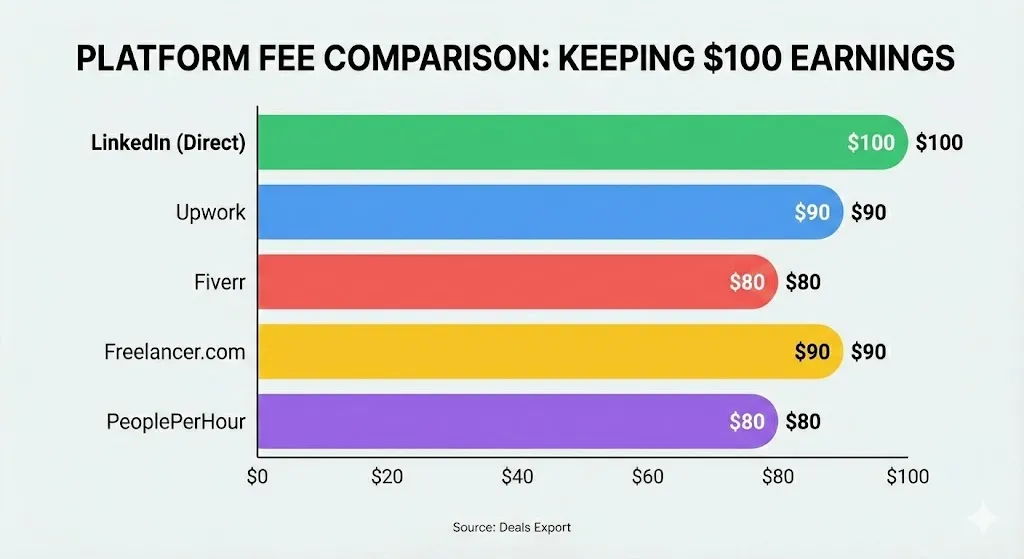
- Fees: Fiverr takes a flat 20% commission from your earnings. If you earn $100, you keep $80.
- Buyer Bias: The platform tends to side with buyers in disputes.
Strategy: Start with low prices to get your first 5 reviews, then gradually increase your rates.
2. Upwork (Best for Long-Term Careers)
Correction: Previously referred to as “Upclass” in some guides, the correct platform is Upwork. It is the giant of the industry.
How it Works:
Clients post job descriptions (e.g., “Need a writer for a 3-month blog project”). You submit a proposal and a cover letter explaining why you are the best fit.
Pros:
- High Pay Potential: Corporate clients and businesses use Upwork.
- Hourly Protection: If you use their desktop app tracker, payment for hourly work is guaranteed.
- Variety: Everything from legal consulting to basic typing jobs.
Cons:
- The “Connects” System: Applying for jobs costs “Connects” (virtual currency). You get a few for free, but eventually, you have to pay to apply for jobs.
- Fees: Upwork takes a 10% service fee on your billings.
- Approval: Getting your profile approved can sometimes be difficult if your category is saturated.
3. Freelancer.com (Best for Contests)
One of the oldest players in the game. It is famous for its “Contest” feature, which is great for creative beginners.
How it Works:
You can bid on projects (similar to Upwork) or enter Contests. In a contest, a client asks for a logo. 50 designers submit their work. The client picks one winner who gets the money.
Pros:
- Contests Build Portfolios: Even if you don’t win, you have a new design for your portfolio.
- Volume: Massive amount of jobs posted daily.
Cons:
- Spam: The platform has a higher number of spam clients compared to Upwork.
- Fees: They charge fees for accepting projects and for upgrades.
- Spec Work: In contests, you work for free with no guarantee of payment.
4. LinkedIn Services (Best for Networking)
While primarily a social network, LinkedIn is now a major freelance hub.
How it Works:
Optimize your profile headline (e.g., “Freelance Graphic Designer”). Use the “Open to Work” frame and set up a “Service Page” on your profile.
Pros:
- Zero Fees: LinkedIn does not take a cut of your pay (unless you use their specific marketplace, but most deals happen in DMs).
- High Trust: Clients can see your real history and connections.
Cons:
- Slow Burn: It takes time to build a network.
- Outbound Sales: You often have to reach out to people; jobs don’t always come to you.
5. PeoplePerHour (Best for UK/European Clients)
This platform is excellent for beginners who want to target the UK and European markets.
How it Works:
It combines the best of Fiverr and Upwork. You can post “Offers” (fixed-price bundles) or bid on projects.
Pros:
- Quality Control: They vet freelancers, meaning less competition from spam bots.
- Location-Based: Great if you are in a timezone compatible with Europe.
Cons:
- Application Process: You must apply to join, and rejection is possible.
- Fees: Starts at 20% commission for the first £250 earned.
Specialized & Niche Websites
If you have a specific skill, general marketplaces might be too crowded. Try these niche sites.
6. Guru
Guru has been around for decades. It is known for its “WorkRooms” feature that makes collaborating with teams easy. It uses a “Quote” system rather than a bidding system. It is solid, safe, and professional, though slightly less traffic than Upwork.
7. TaskRabbit & Thumbtack (Best for Local/Manual Work)
Not all freelancing is digital. If you are handy, these apps are gold.
- Best For: Furniture assembly, cleaning, moving help, plumbing, electrical work.
- Pros: Quick payment, local work.
- Cons: Requires physical labor and travel.
8. 99designs (Best for Pure Designers)
Dedicated exclusively to graphic design (logos, book covers, merch). It relies heavily on the contest model.
- Warning: Great for building a portfolio, but risky for income since you only get paid if you win the design contest.
9. Rev.com & TranscribeMe (Best for Transcription)
If you are a good listener and fast typer, these sites are great entry points.
- The Job: Listen to audio files and type what you hear.
- The Pay: Generally low ($0.30 – $1.10 per audio minute), but it is legitimate and pays weekly via PayPal.
10. Toptal (The “Expert” League)
Correction: Previous guides listed this for beginners. Toptal is NOT for beginners.
They accept only the top 3% of applicants. You must pass rigorous coding or design tests. However, if you are an expert, this is the holy grail. No bidding—they match you with Fortune 500 clients, and the pay is very high. Keep this as a goal for your future.
How to Stay Safe (Avoiding Scams)
Freelance beginners are prime targets for scammers. Because you are eager for work, bad actors will try to exploit you. Here is how to stay safe.
The “Telegram” Red Flag
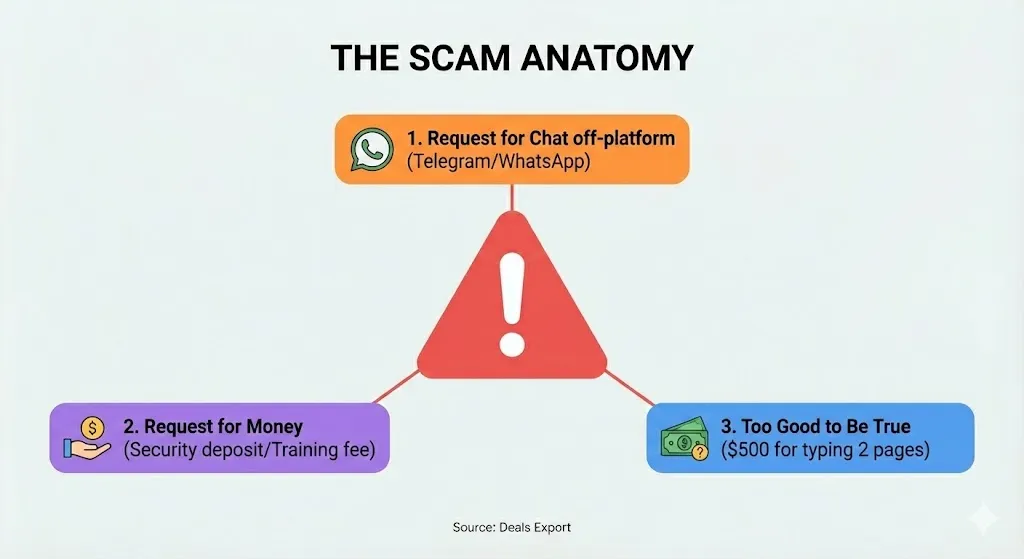
If a client on Upwork or Fiverr says, “Message me on Telegram/WhatsApp to discuss the job,” it is a scam.
Why? They want to take you off the protected platform to steal your information or make you work for free. Always keep communication on the freelance website.
The “Security Deposit” Scam
Real jobs pay you. You never pay them.
If a client asks for a “security fee,” “ID card fee,” or “equipment reservation fee” before you start working, block them immediately.
The “Check Overpayment” Scam
A client sends you a check for $2,000 when the job was $500, and asks you to “refund the difference.” The check will bounce weeks later, and you will have lost the money you “refunded.”
Step-by-Step Guide to Landing Your First Job
You have picked a platform and a skill. Now, how do you actually get hired?
Step 1: The Profile Picture & Headline
Your photo should be professional. No selfies in sunglasses, no party photos. Look trustworthy.
Your headline should be specific.
- Bad: “I do freelance work.”
- Good: “WordPress Developer | PHP Expert | E-commerce Specialist”
Step 2: The Portfolio (Even if you are new)
If you have no clients, do “spec work.” Redesign a famous logo. Rewrite a bad blog post you found. Create a mock spreadsheet. Upload these to your profile. Clients need to see proof, not just promises.
Step 3: The Proposal Strategy
When applying on Upwork or Guru, do not copy-paste generic messages.
- Read the job post carefully. If they mention a specific problem, address it.
- Keep it short. Clients are busy.
- Ask a question. “Do you have a preference for the color scheme?” This forces them to reply.
Step 4: Pricing for Beginners
There are two ways to price yourself:
- Hourly: Good for vague projects (e.g., Virtual Assistant).
- Fixed Price: Good for clear deliverables (e.g., Logo Design).Tip: Do not be the cheapest option. Cheap clients are often the most difficult. Be affordable, but value your time.
Conclusion
Freelancing is a marathon, not a sprint. You likely won’t become a millionaire in your first month. You might face rejections. You might have days where you feel like giving up. This is normal.
The key is consistency.
- Sign up for two platforms (e.g., Fiverr and Upwork).
- Polish your profile until it shines.
- Send proposals every single day.
- Deliver excellent work to your first client to get a 5-star review.
Once you have that first review, the second job becomes easier. Then the third. Before you know it, you are a full-time freelancer.
Ready to start? Pick one website from the list above, create your account today, and take the first step toward financial freedom.